
Communication for Groups - Get APK
You'll be able to download in few seconds.
Publisher Description
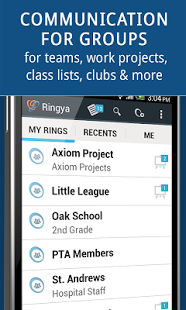
Ringya is the first viable communication solution for groups such as parents, work teams, clubs, organizations and communities. Ringya is the Whatsapp for larger, more complex groups that have diverse communication needs.
Use Ringya to:
* Easily create any size groups; just snap a picture or email a file and you’re done!
* Call, text, email and chat with individuals, groups and subgroups
* Group chat that everyone gets even if they don’t have Ringya
* Know who’s call you and how they fit into your world (e.g. Dan, Mike’s dad, Grade 2)
* Search by title or role to find people even if you don’t remember their name
* Great for work teams, parents, teachers, communities, clubs and more
Ringya is great for parents. With Ringya, parents can get in-touch with fellow school class or kindergarten parents to:
* Reach a new friend’s parent to schedule a playdate without searching for that fridge list
* Find a parent to help with child pickup when you’re stuck in a traffic jam
* Let team members know a game venue has moved due to weather conditions
* Invite or remind of your kids birthday party via text or email in just one click
* Share entire contact lists with others – e.g. Babysitters, Cleaners
* Chat with other parents
Teachers and educators can:
* Remind parents about field trips, homework or upcoming school class activities
* Get feedback from parents and discuss class issues using the message board
* Chat with other teachers about school or class activities
Be the office Hero! Project managers, office admins and team members can:
* Create a mobile office directory or company directory
* Update about project or team meeting
* Make sure everyone has all the team or project contact info handy
* Chat with colleagues and team members
PTA, PTSA, PTO and school or kindergarten staff can:
* Publish the school directory or specific class directories in a smartphone version
* Make staff contact information easily available to parents
* Manage PTA and PTO teams efficiently as Ringya groups
Communities and religious groups such as a church, synagogue, temple or mosque can:
* Increase the sense of community by allowing community members to interact with each other
* Announce community events and make sure everyone gets such announcements even if they don’t have Ringya or a smartphone at all
Clubs (reading clubs, biking clubs, running groups and the like) can:
* Help members keep in touch with each other
* Use the Ringya message board to announce club activities
* Coordinate club events
Homeowners associations can:
* Publish a residents’ directory on the smartphone
* Make announcements and facilitate group discussions
* Send alters in case of emergency
Coaches and sport teams can:
* Easily send messages and announcements to all team members
* Coordinate last minute schedule changes using the built-in message board
* Allow players and team members to easily call, text, email and chat with each other
* For younger children (e.g. little league) update parents about team achievements and activities
Restaurants and other shift oriented establishments can:
* Manage and share shift assignments
* Quickly find a replacement when someone calls in sick
* Update shift managers about new staff and assignments
Families can:
* Create an always up-to-date extended family directory which all family members can update and any change is updating everyone
* Create a family emergency list and share with nanny, babysitters and extended family members
* Use the built in message board to keep in touch and coordinate extended family activities
About Communication for Groups
The company that develops Communication for Groups is Ringya. The latest version released by its developer is 1.0 .
To install Communication for Groups on your Android device, just click the green Continue To App button above to start the installation process. The app is listed on our website since 2016-10-15 and was downloaded 0 times. We have already checked if the download link is safe, however for your own protection we recommend that you scan the downloaded app with your antivirus. Your antivirus may detect the Communication for Groups as malware as malware if the download link to com.ringya is broken.
How to install Communication for Groups on your Android device:
- Click on the Continue To App button on our website. This will redirect you to Google Play.
- Once the Communication for Groups is shown in the Google Play listing of your Android device, you can start its download and installation. Tap on the Install button located below the search bar and to the right of the app icon.
- A pop-up window with the permissions required by Communication for Groups will be shown. Click on Accept to continue the process.
- Communication for Groups will be downloaded onto your device, displaying a progress. Once the download completes, the installation will start and you'll get a notification after the installation is finished.
Program Details
System requirements
Download information
Pricing
Version History
version
posted on 2016-10-15
*Bug fixes
version 1.15.0.08
posted on 2013-07-02
Several fixes and updates
Disclaimer
External Download
We do not host Communication for Groups on our servers. We did not scan it for viruses, adware, spyware or other type of malware. This app is hosted by Galad and passed their terms and conditions to be listed there. We recommend caution when installing it.
The APK Download link for Communication for Groups is provided to you by apps112.com without any warranties, representations or guarantees of any kind, so access it at your own risk.
If you have questions regarding this particular app contact the publisher directly. For questions about the functionalities of apps112.com contact us.
